Why kitchen management matters now
Hospitality kitchens are no longer receiving orders from one place. A single venue may be processing orders from EPoS tills, self-service kiosks, mobile apps and pre-order channels at the same time. The challenge is not simply getting those orders into the kitchen; it is making sure every item, modifier and special requirement reaches the right team quickly and accurately, then keeping staff and customers informed as the order progresses.
That is where a modern Kitchen Management System (KMS) comes in. In simple terms, a KMS creates a structured digital flow from order placement through preparation to collection or delivery. Rather than relying on printed tickets, verbal hand-offs or disconnected screens, operators can bring front and back of house together around the same live order information.
Lolly’s Kitchen Management System is designed to connect orders from EPoS, SelfServe and the Lolly app directly with kitchen screens, while also supporting order status, allergen information, waste tracking and inventory management. Explore Lolly Kitchen Management Systems
What is a kitchen management system?
A kitchen management system is software that helps a commercial kitchen receive, organise, prepare and track customer orders. Depending on the platform, it can also support stock and waste visibility, reporting, staff coordination and communication with front-of-house teams or customers.
The important point is that a KMS is broader than simply replacing a paper ticket with a screen. The best systems help create a consistent operational workflow: orders arrive in the right place, kitchen teams see the information they need, order status is updated as work progresses, and the wider business can use that data for reporting and decision-making.
KMS, KDS and KVS: what is the difference?
The terminology can be confusing because different suppliers use KMS, KDS and KVS in slightly different ways. Rather than focusing too heavily on the acronym, buyers should look closely at what the system actually does and how it fits into the wider ordering journey.
Within Lolly’s own kitchen management range, these functions are split across three core displays: Lolly Chef for food and drink orders, Lolly Barista for drink orders, and Lolly Order to show orders in preparation and ready for collection. Different venues can use different combinations depending on the way they operate.
How does a kitchen management system work?
At its simplest, a KMS turns the customer order into a controlled digital workflow. The precise setup will vary, but the journey typically looks like this:
1. The customer places an order through EPoS, a self-service kiosk, a mobile app or another connected channel.
2. The order is routed automatically to the relevant kitchen or drinks station.
3. Kitchen staff see the items, modifiers, special requirements and relevant allergen information on screen.
4. The order moves through preparation stages as staff work on it.
5. Front-of-house systems or customer-facing displays are updated when the order is ready.
For example, a restaurant may only need a Lolly Chef screen to manage food orders, while a coffee shop may rely more heavily on Lolly Barista. A busy quick-service environment can use Chef, Barista and Order together to separate preparation workflows while keeping customers informed.
Why EPoS and ordering-channel integration matters
Seeing an order appear on a kitchen screen does not automatically mean the systems behind it are fully integrated. A basic connection may pass only part of the order downstream. Proper integration should preserve the data that matters: products, modifiers, status, dietary or allergen information, transaction references and reporting data.
This becomes particularly important when a customer creates a more complex order. If modifiers or changes are lost between the till and kitchen, the operational impact can be immediate: incorrect preparation, remakes, delays and reporting inconsistencies. Real-time synchronisation also matters during busy periods, because even small delays can compound when order volume increases.
For a deeper explanation of native integration, field mapping and system architecture, read Connecting EPoS to Kitchen Management Systems: Architecture Explained.
See how Lolly connects EPoS, ordering and kitchen workflows. View the Kitchen Management System
What operational benefits can a KMS deliver?
Faster, more controlled service
Digital order routing gives kitchen teams a clearer view of what has been ordered and what needs to happen next. It can reduce reliance on paper tickets, minimise unnecessary hand-offs and make it easier to prioritise work during busy periods. For operators, the useful measures are not vague promises of “efficiency”, but preparation time, orders completed per hour and peak-period capacity.
For more detail on workflow and throughput, see How Kitchen Display Systems Improve Speed of Service in High-Volume Environments.
Fewer lost or incorrectly prepared orders
When order information travels directly from the ordering channel to the kitchen, there are fewer opportunities for details to be lost through re-keying, handwriting or verbal communication. Clear screens also give staff a single place to check modifiers, special requests and order status. That can help reduce remakes and the time spent correcting avoidable mistakes.
For the wider labour and error-reduction case, read Kitchen Management Systems: Reducing Errors & Labour Costs.
Better communication between front and back of house
A shared digital workflow means front-of-house staff do not need to repeatedly enter the kitchen to ask where an order is. Kitchen teams can update an order as it moves through preparation, and customer-facing Order & Collect displays or app notifications can reflect that progress. The result is clearer communication around the same order status rather than a chain of separate updates.
Better visibility of allergens and special requirements
Lolly’s KMS can pass special requirements and allergen information through to kitchen staff in real time. Technology should never be treated as a substitute for robust allergen processes and staff training, but accurate digital communication can support those processes by making relevant information visible at the point of preparation.
Waste and stock visibility
Kitchen management technology can also provide operators with better visibility of waste and inventory. Lolly’s system includes waste tracking and inventory management features, helping teams monitor stock levels and identify patterns that may otherwise remain hidden. Used alongside sales and production data, that information can support tighter purchasing and margin control.
How do you choose a kitchen management system that can scale across multiple sites?
For a multi-site operator, the question is not simply whether a KMS works in one kitchen. It needs to support consistent processes as new locations, screens and ordering channels are added. A fragmented setup can create a fresh integration and reporting problem every time the estate grows.
Lolly’s single software platform is designed to allow operators to expand their kitchen setup over time, while Lolly HQ provides a cloud-based interface for monitoring, reporting, analysis and insight across connected products. That creates the opportunity to compare performance between locations, standardise workflows and keep a clearer view of the wider operation from one place.
What should a kitchen management system integrate with?
Most operators should consider how the kitchen system connects with the rest of the technology estate, including:
- EPoS and mobile EPoS
- Self-service kiosks
- Mobile or app ordering
- Order-status and digital signage
- Inventory and stock systems
- Reporting and management information
- Other business systems where relevant
A useful buyer question is: “What information moves between these systems, in which direction, and is it updated in real time?” That is much more revealing than simply asking whether two products can connect.
Do I need separate systems for EPoS, kiosks and kitchen management?
They may be separate functional components, but they should not operate as separate operational silos. The more important question is whether orders, product information, modifiers, status updates, payments and reporting data can move reliably between them without staff re-keying information or reconciling disconnected systems. A connected setup can still use specialist screens and interfaces for different jobs, while keeping the underlying workflow and data joined up.
How do you know when you've outgrown your current kitchen system?
A kitchen setup can continue to function long after it has stopped supporting the way the business actually operates. The warning signs are usually operational rather than technical. You may have outgrown the current setup if:
- staff regularly re-key orders or information between systems
- different ordering channels create separate kitchen workflows
- sites use inconsistent processes or reporting methods
- management teams spend too much time reconciling data or compiling reports
- adding a new site, screen or ordering channel creates another standalone integration project
- peak periods expose delays, lost information or capacity limits that the existing setup cannot handle.
Those symptoms do not automatically mean the whole technology estate needs replacing. They do, however, suggest it is worth reviewing whether the current kitchen workflow, integrations and reporting structure can scale with the business.
How should operators assess costs and ROI?
The cost of a kitchen management system will depend on the operation. Variables can include the number of sites, the number of screens or stations, hardware requirements, ordering channels, integration complexity, configuration, installation, staff training, support and ongoing software or licensing.
Rather than looking at purchase price in isolation, operators should compare those costs with the operational problems the system is expected to solve. Useful baseline measures include:
Remakes: current remakes per week multiplied by the average food and labour cost of each remake.
Labour efficiency: orders processed per labour hour before and after implementation.
Throughput: average preparation time, orders completed per hour and peak-period capacity.
Waste: ingredient waste, spoilage, remakes and waste value as a percentage of sales.
Management time: hours spent compiling reports, reconciling systems or investigating discrepancies.
Revenue opportunity: whether shorter queues and faster throughput allow the operation to capture demand that is currently being lost.
A simple KMS ROI framework
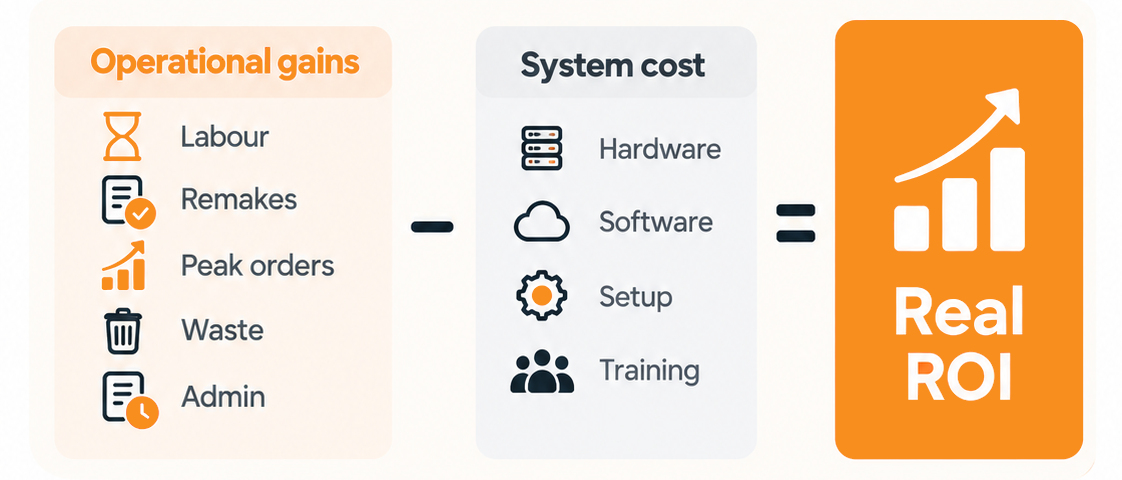
A practical business case can be built by adding together the operational value the system is expected to create, then comparing that with the full cost of implementation.
Annual operational benefit = labour time saved, reduced remakes and errors, reduced food waste, additional peak-period orders captured, management and reporting time saved.
Minus: hardware + software + implementation + training + ongoing support
The calculation will vary by venue, but using real pre-implementation baselines makes the ROI discussion much more useful than comparing headline licence prices alone.
What should you look for when choosing a KMS?
A good buying conversation should go beyond screen size and headline features. Ask whether the system:
- integrates properly with your EPoS rather than simply passing basic tickets
- can handle all relevant ordering channels
- allows workflows to be configured around the way your kitchen actually works
- updates order status in real-time
- communicates modifiers, dietary information and special requirements clearly
- provides reporting that is useful to both site teams and head office
- can scale across multiple sites without adding unnecessary complexity
- uses hardware suitable for demanding kitchen environments
- comes with clear implementation, training and technical support
What does a Lolly Kitchen Management System include?
Lolly’s kitchen management solution is built around a flexible combination of screens and a shared software platform. Lolly Chef manages food and drink orders, Lolly Barista focuses on drinks, and Lolly Order provides a customer-facing view of orders in preparation or ready for collection. The wider Lolly HQ platform brings monitoring, reporting and insight together across connected Lolly products.
That means the same approach can be configured differently for a restaurant, coffee shop, quick-service operation or a larger multi-site catering environment. Operators can start with the components they need and expand the setup as their requirements change.
Want to see how a Kitchen Management System could fit your operation? Explore Lolly Kitchen Management Systems or book a demo.